The 9th System Analysis and Modeling (SAM) conference

Helmut Neukirchen, 1. June 2016

Call for Papers

The System Analysis and Modeling (SAM) conference provides an open arena for participants from academia and industry to present and discuss the most recent innovations, trends, experiences and concerns in modeling, specification and analysis of distributed, communication and real-time systems using ITU-T’s Specification and Description Language (SDL) and Message Sequence Charts (MSC), as well as related system design languages (including but not limited to UML, ASN.1, TTCN, SysML and URN). 

As in previous editions, SAM 2016 will be co-located with the MODELS 2016. The SAM conference originates from the use of languages and techniques for telecommunications applications, whereas MODELS has a background in the application of UML. However, UML is also used for telecommunications, and the languages standardized by ITU-T (ASN.1, SDL-2010, MSC, TTCN-3, URN) are also used for other applications. The MODELS 2016 conference week is a unique opportunity to attend both of these events with overlapping domains of interest.

Scope and Topics

The 2016 edition of the conference is under the theme of Technology-specific aspects of Models. This theme includes domain-specific aspects of models and peculiarities of using models for different technologies, including, but not limited to the Internet of Things (IoT), automotive software, cloud applications, and embedded software. Moreover, we encourage people to consider publishing information about the usage of models for different purposes and the combination with different software engineering technologies, including, but not limited to software testing, requirements engineering, and automated code generation. 

In addition to our theme, we also invite contributions from a broader range of topics from the following non-exhaustive list:

Models and quality:

  • models quality assurance; quality of models and model artefacts; design of reusable models artefacts; reuse of model artefacts; characteristics of model quality.

Language development:

  • domain-specific languages and language extensions; standardization of language profiles; evolution of language standards; modular language design; semantics; evaluation of languages; languages for real-time systems; performance and other non-functional properties.

Model-driven development:

  • systems engineering; analysis and transformation of models; verification and validation of models; simulation; systematic testing based on and applied to models; tool support.

Applications:

  • Using Specification and Description Language, Message Sequence Charts, UML, SysML, ASN.1, TTCN-3, User Requirements Notation, and related languages.
  • Industrial usage reports; experiences from education; domain-specific applicability (e.g., in automotive, aerospace, telecommunication, process automation and healthcare); methodologies for applications.
  • Application reports should focus on what is effective (and ineffective) in applying a technique preferably backed up by some measurements. A report should not just describe an implementation, though new application areas are of interest.

Location and Venue

SAM 2016 will be held in Saint-Malo, France on October 3rd – 4th 2016. The conference will be co-located with the MODELS 2016.

Submission and Publications

All accepted papers will be published in the well-known Springer Lecture Notes on Computer Science. Submissions must be previously unpublished, written in English, and use the LNCS style as described in the LNCS Author and Editor Guidelines. Authors are strongly encouraged to use the LaTeX version of the template. Papers accepted or under review for other events are ineligible for submission to SAM 2016. Submissions in the following categories are solicited:

  • Full papers describing original, unpublished results (max. 16 pages in LNCS style)
  • Short papers describing work in progress (max. 8 pages in LNCS style)

All page limits are including illustrations, bibliography and appendices. Failure to use the LNCS style and comply to the page limit will lead to a desk-reject of the submission.

The SAM 2016 Program Committee will evaluate the technical contributions of each submission as well as its accessibility to the audience. Papers will be judged based on significance, originality, substance, correctness, and clarity.

Information on how to submit your paper can be found on the submission page.

Important Dates

  • Submission of Abstracts: Sunday, June 19th 2016
  • Submission of Papers: Sunday, June 26th 2016
  • Notification: Wednesday July 27th 2016
  • Camera Ready: Friday, August 5th 2016
  • SAM 2016: Monday, October 3rd and Tuesday, October 4th 2016

Requirements for authors

Accepted papers have to be presented by one of the authors at the SAM 2016. A full SAM 2016 conference registration is required for each accepted paper. Failure to comply to these requirements may result in the exclusion of the paper from the proceedings.

CORBA remote object IORs in a NAT environment

Helmut Neukirchen, 23. October 2015

When running CORBA remote objects in a NAT environment (assuming Internet protocols are used), the IIOP IOR remote object references that will be created (and registered at some nameservice) will contain the private IP address (to convince yourself: dump the IOR as string and paste that string in http://www2.parc.com/istl/projects/ILU/parseIOR/). As a result, when a client outside the NAT environment looks up the IOR, it will get one containing the private IP and access to the remote object does of course not work. For the Oracle OpenJDK CORBA implementation, the following command line parameter needs to be provided to both the ORB and the JVM running at the remote object side:
-ORBServerHost PublicIPofServer

Concerning the ports:
By default, the Oracle OpenJDK is using TCP port 1049 for the activation service. You can change this port via the ORB command line parameter -port.

The port used for the CORBA Naming Service (which is automatically provided by the OpenJDK Java ORB) depends on whether orbd is started as root or as an ordinary user: when started as root, TCP port 900 is used, otherwise TCP port 1049 (because ports lower than 1024 can only be created by root). Unfortunately, TCP port 1049 is also used by the activation service as described above. Hence, a port collision (=exceptions) will occur (what a stupid design)!
In this case, let the ORB start the Naming Service e.g. on TCP port 1050:
orbd -ORBInitialPort 1050

When changing the Naming Service port from the default 900, client and server JVMs that use that Naming Service also need to know about the changed Naming Service port number: Start the JVMs with additional parameter:
java -ORBInitialPort 1050

When running client and server on different hosts, take care that they use the same Naming Service. Assuming that the Naming Service running on the server's host is used: the server will anyway use this local Naming Service, but the client needs to know the hostname of the server's Naming Service: start the client JVM with additional parameter:
java -ORBInitialHost nameserverhost

Note that in addition to these standard services (Activation and Naming), CORBA uses by default dynamically assigned TCP ports (=expect difficulties with firewalls) for all further objects such as your own remote objects that are contained in the IORs. However, you can enforce a port to be used by a servant created within a JVM using the additional parameter:
java -ORBServerPort port

Giving external students access to UGLA documents

Helmut Neukirchen, 16. October 2015

Sometimes, students that are not registered for a course (but have an UGLA account), need access to course material in UGLA. This can be achieved as follows:

  1. Operations -> Users and groups
  2. New group
  3. Give the new group some name, e.g. External access. Confirm. (UGLA allows to select registered students to be added here, but leave the group empty!)
  4. On the group overview page click on the newly created group.
  5. Add user
  6. In the SSI/kennitala field: either enter kennitala or the person's full HÍ email address. Save.
  7. All operations -> Change group permission. Change permissions accordingly. NOTE: giving permissions for a folder does not recursively apply to the file contained in the folder -- you need to change each and every individual file as well!
  8. Using the URL that you get from "Front Page" link (or simply via the link provided in the course catalogue), the persons should be able to access the folder.

Alternatively, in the Files and Folder area, you can for individual files and folders change the access permissions using the Edit/pen symbol -> Access Permissions

If you have a person without UGLA account, the only possibility is to make the whole course page world-wide visible:

  1. All Operations -> Change front page title -> At Access to the Teaching Web, select Open for everybody (no authentication)

This and other things (e.g. electronic homework submissing incl. student view of this) is also explained (in Icelandic) at Kennslumiðstöð.

Errata CDK5 book on Distributed Systems 5th edition by Coulouris, Dollimore, Kindberg and Blair

Helmut Neukirchen, 1. September 2015

While the CDK5 homepage lists some errata, I found more that are listed below (I reported them, however they did not make it into the official errata):

Table in Figure 3.23: Lower bound of 3G phone bandwidth is 0.384 Mbps, not 384 Mbps. As an update: 4G currently is up to 300 Mbps and has latencies as low as 5 ms.

The table in Figure 3.23 is at least outdated if not wrong, e.g. 10Base5 is only about the 500 m STP; the "T" standards are about twisted pair cables, hence listing coaxial cable (STP) lengths there makes no sense. 1000BaseT allows nowadays 100m twisted pair cables. The "fibre" lines refer rather ot the "F" standards not "T" as the column headings suggest. Furthermore, mono-mode fibre length for 1000BaseF has made significant advancements. Finally, 10GBase, 40GBase and 100GBase are now available.

Further errata to come...

Debian Linux on Thinkpad X250

Helmut Neukirchen, 4. March 2015

What I did to install Debian Linux (Jessie) on Thinkpad X250:

Booting from USB device (to install Debian) was some challenge: in particular USB 3 needed to be disabled in BIOS (maybe some more BIOS tweaks that I cannot remember anymore).

To make the Trackpoint keys work:

In BIOS, disable Touchpad (anyway a good idea to prevent accidental touches there).

Added file /etc/modprobe.d/x250.conf with content
options psmouse proto=imps

Added file /usr/share/X11/xorg.conf.d/20-thinkpad.conf with content (works only if Touchpad is disabled in BIOS)

Section "InputClass"
Identifier "Trackpoint Wheel Emulation"
MatchProduct "PPS/2 IBM TrackPoint|DualPoint Stick|Synaptics Inc. Composite TouchPad / TrackPoint|ThinkPad USB Keyboard with TrackPoint|USB Trackpoint pointing device|Composite TouchPad / TrackPoint|PS/2 Synaptics TouchPad"
MatchDevicePath "/dev/input/event*"
Option "EmulateWheel" "true"
Option "EmulateWheelButton" "2"
Option "Emulate3Buttons" "false"
Option "XAxisMapping" "6 7"
Option "YAxisMapping" "4 5"
EndSection

Also to make side button of my Logitech USB mouse act as middle button:
Added file 20-logitech-mouse-side-button.conf with content

Section "InputClass"
Identifier "Logitech mouse side button remap"
MatchProduct "Logitech USB Receiver"
MatchDevicePath "/dev/input/event*"
Option "ButtonMapping" "1 0 3 4 5 6 7 2 9 10"
EndSection

(Still sometimes Logitech mouse stops completely to work, then unplugging USB receiver from docking station works -- still need to investigate that. Update it seems that plugging in the USB receiver into another USB port (=other USB type) helps.)

I also experience sometimes that my external Dell monitor connected via DP cable and my dock sometimes blanks for half a second: a firmware update of the dock is needed, but is only available as MS Windows executable. Any hints welcome how to do this via Linux! (A BIOS update via Linux is possible and worked.)
I do not have that problem when using the DVI-D port and cable of the dock -- however for 4k resolution, DP is better than DVI!

I also had an old 1440x900 display that did not report its native resolution when connected via VGA (which btw. reports as DP2). While I might probably add some modeline to some xconfig file as I last did probably 10 years ago, I did the following:

cvt 1440 900
Then pasted the modeline generated by cvt:
xrandr --output DP2 --newmode "1440x900_60.00" 106.50 1440 1528 1672 1904 900 903 909 934 -hsync +vsync
xrandr --addmode DP2 "1440x900"
xrandr --output DP2 --mode 1440x900

Also my other display sometimes gets no recognised:

cvt 1920 1080
Then pasted the modeline generated by cvt:
xrandr --output DP2 --newmode "1920x1080_60.00" 173.00 1920 2048 2248 2576 1080 1083 1088 1120 -hsync +vsync
xrandr --addmode DP2 "1920x1080"
xrandr --output DP2 --mode 1920x1080

For getting cloned display output with KDE "Display and Monitor" configuration system setting pane, the two screens have to dragged onto each other. However, I like
the old "Size & Orientation" pane more which can be obtained by installing the kde-workspace-randr package.

Just as reminder for me: to use Gutenprint for the photoprinter: create first in CUPS (e.g. via web interface) an entry for the photoprinter so that the printer gets an own queue. Then, in Gimp, this queue can be used when setting up the photoprinter there. In case the Print with Gutenprint menu entry does not show up in Gimp, an extra package needs to be installed: IIRC for Debian it is package: gimp-gutenprint
What I did to install Debian Linux (Jessie) on Thinkpad X250:

Booting from USB device (to install Debian) was some challenge: in particular USB 3 needed to be disabled in BIOS (maybe some more BIOS tweaks that I cannot remember anymore).

To make the Trackpoint keys work:

In BIOS, disable Touchpad (anyway a good idea to prevent accidental touches there).

Added file /etc/modprobe.d/x250.conf with content
options psmouse proto=imps

Added file /usr/share/X11/xorg.conf.d/20-thinkpad.conf with content (works only if Touchpad is disabled in BIOS)

Section "InputClass"
Identifier "Trackpoint Wheel Emulation"
MatchProduct "PPS/2 IBM TrackPoint|DualPoint Stick|Synaptics Inc. Composite TouchPad / TrackPoint|ThinkPad USB Keyboard with TrackPoint|USB Trackpoint pointing device|Composite TouchPad / TrackPoint|PS/2 Synaptics TouchPad"
MatchDevicePath "/dev/input/event*"
Option "EmulateWheel" "true"
Option "EmulateWheelButton" "2"
Option "Emulate3Buttons" "false"
Option "XAxisMapping" "6 7"
Option "YAxisMapping" "4 5"
EndSection

Also to make side button of my Logitech USB mouse act as middle button:
Added file 20-logitech-mouse-side-button.conf with content

Section "InputClass"
Identifier "Logitech mouse side button remap"
MatchProduct "Logitech USB Receiver"
MatchDevicePath "/dev/input/event*"
Option "ButtonMapping" "1 0 3 4 5 6 7 2 9 10"
EndSection

(Still sometimes Logitech mouse stops completely to work, then unplugging USB receiver from docking station works -- still need to investigate that. Update it seems that plugging in the USB receiver into another USB port (=other USB type) helps.)

I also experience sometimes that my external Dell monitor connected via DP cable and my dock sometimes blanks for half a second: a firmware update of the dock is needed, but is only available as MS Windows executable. Any hints welcome how to do this via Linux! (A BIOS update via Linux is possible and worked.)
I do not have that problem when using the DVI-D port and cable of the dock -- however for 4k resolution, DP is better than DVI!

I also had an old 1440x900 display that did not report its native resolution when connected via VGA (which btw. reports as DP2). While I might probably add some modeline to some xconfig file as I last did probably 10 years ago, I did the following:

cvt 1440 900
Then pasted the modeline generated by cvt:
xrandr --output DP2 --newmode "1440x900_60.00" 106.50 1440 1528 1672 1904 900 903 909 934 -hsync +vsync
xrandr --addmode DP2 "1440x900"
xrandr --output DP2 --mode 1440x900

Also my other display sometimes gets no recognised:

cvt 1920 1080
Then pasted the modeline generated by cvt:
xrandr --output DP2 --newmode "1920x1080_60.00" 173.00 1920 2048 2248 2576 1080 1083 1088 1120 -hsync +vsync
xrandr --addmode DP2 "1920x1080"
xrandr --output DP2 --mode 1920x1080

For getting cloned display output with KDE "Display and Monitor" configuration system setting pane, the two screens have to dragged onto each other. However, I like
the old "Size & Orientation" pane more which can be obtained by installing the kde-workspace-randr package.

Just as reminder for me: to use Gutenprint for the photoprinter: create first in CUPS (e.g. via web interface) an entry for the photoprinter so that the printer gets an own queue. Then, in Gimp, this queue can be used when setting up the photoprinter there. In case the Print with Gutenprint menu entry does not show up in Gimp, an extra package needs to be installed: IIRC for Debian it is package: gimp-gutenprint

Update 27.5.2024: With Debian Bookworm, I can in the CUPS web interface not detect the photoprinter. Install the package printer-driver-gutenprint did make the printer show in the CUPS administrator interface.

But then, I got an error message about an incorrect paper format. I then compiled the latest version of Gutenprint manually -- but this did not compile the Gimp plugin, so I had to install first libgimp2.0-dev.

Still, that did not work, so I had to downgrade the packages to the Gutenprint version prior to the regression:


The issue is resolved by removing these packages and manually installing the packages from Jammy:

libgutenprint-common/jammy,jammy,now 5.3.3-9 all
libgutenprint9/jammy,now 5.3.3-9 amd64
printer-driver-gutenprint/jammy,now 5.3.3-9

For version pinning, create a file in etc/apt/preferences.d with contents:


Package: libgutenprint-common
Pin: version 5.3.3-5
Pin-Priority: 1000
Explanation: Newer versions in Debian have a regression https://sourceforge.net/p/gimp-print/discussion/4359/thread/8fca54c027/

Package: libgutenprint9
Pin: version 5.3.3-5
Pin-Priority: 1000
Explanation: Newer versions in Debian have a regression https://sourceforge.net/p/gimp-print/discussion/4359/thread/8fca54c027/

Package: printer-driver-gutenprint
Pin: version 5.3.3-5
Pin-Priority: 1000
Explanation: Newer versions in Debian have a regression https://sourceforge.net/p/gimp-print/discussion/4359/thread/8fca54c027/

Once Debian has versions as new as 5.3.4-2023-08-23 (e.g. in sid), these packages can be used.

RICOH driversy
When I tried to install some Ricoh printer-specifc PPDs (offered by CUPS), that gave an error:


The PPD version (5.3.3) is not compatible with Gutenprint 5.3.4-2023-12-14T01-00-6a3da773. Please run `/usr/sbin/cups-genppdupdate' as administrator."

Running that command did not resolve the problem, so I chose some generic PDF driver offered by CUPS in the Ricoh section and that one worked. However, that PPD offered only A4, not A3. But by copying over from the not-working printer specific PPD all lines containing A3, that worked. I probably shall do the same for A4, because the printer itself always complains that this is the wrong A4 and I need to confirm printing to A4 on the printer user panel (which I do not have to for the copied over A3 format).

After I had then a fresh Debian 12 Bookworm install, the above RICOH problem did not occur: I did just use the Guteprint/CUPS driver for the model (just be aware that there is a RICOH and a Ricoh category that have different entries). As that fresh install did not have my above package mix from the old Jammy, the above Ricoh problem might in fact have been caused by my messing around with CUPS...

Update 5.1.2025:After a fresh Debian 12 Bookworm install, the drivers for my Brother laserprinter were missing. That was solved by: apt install foomatic-db-engine foomatic-db openprinting-ppds psutils

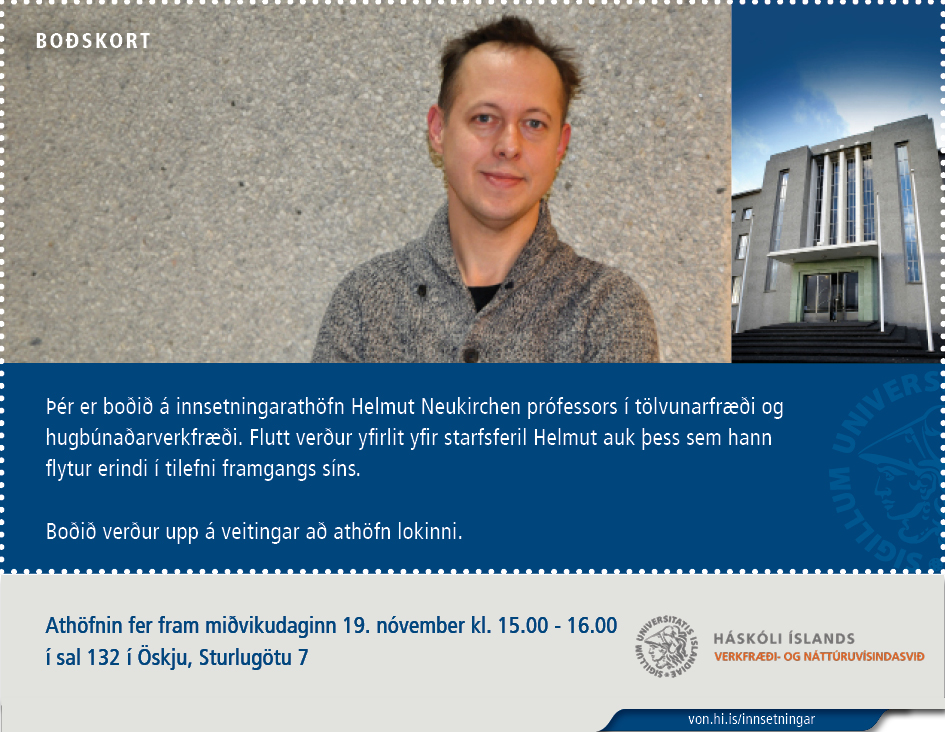
Promotion to full professor: Inaugural lecture

Helmut Neukirchen, 18. November 2014

On Wednesday, 19.11.2014, I will celebrate my promotion to full professor. In an inaugural lecture, I will give an overview on my research areas: distributed systems and software engineering. You are welcome to attend in room 132 of building Askja from 15:00 to 15:40. The lecture will be recorded and will later-on be accessible via the School of Enginering and Natural Sciences web page.

bodskort

The lecture was recorded and uploaded to YouTube by someone who is not familiar with German names.

Doktorsnemi í tölvunarfræði við Verkfræði- og náttúruvísindasvið Ph.D. student position in Computer Science at the School of Engineering and Natural Sciences, University of Iceland.

Helmut Neukirchen, 24. September 2014

See text on English page.The department of Industrial Engineering, Mechanical Engineering and Computer Science, seeks applicants to fill a Ph.D. student position in Computer Science. The project is a part of a larger, Nordic research project called “eScience tools for investigating Climate Change in Northern High Latitudes” (eSTICC) funded by NordForsk – an organisation under the Nordic Council of Ministers that provides funding for Nordic research cooperation.

The goal of the overall research project is a more accurate description of the high-latitude feedback processes in the climate system by improving the eScience tools of the climate research community. The Ph.D. student will develop from a Computer Science perspective scientific workflow schemes and tools to integrate the different data and software that are used by the climate researchers. The idea is to exploit existing workflow solutions, for example from the Grid computing or Multiphysics community, and customise them to enable interoperability of the used climate research eScience tools.

The eSTICC project runs from 2014 to 2018 and the Ph.D. student is funded for 3 years and 7 months. The project will be foundation for the Ph.D. thesis and Helmut Neukirchen and Ebba Þóra Hvannberg, professors in Computer Science at the University of Iceland will supervise. The Ph.D. student will work closely with the other project partners in Northern Europe and visit them.

Applicants should have an MSc degree in Computer Science, Software Engineering, Computational Engineering or a closely related field. Knowledge or interest in high-performance computing or eScience is an advantage. Applicants need to be able to work independently and be active in shaping the project as it progresses in co-operation with the supervisors and the international research team. Good communication skills, an ability to work in a team and willingness to travel are required. The selected candidate will need to send a formal application for a Ph.D. studentship at the University of Iceland in due time.

The application shall include a description of the applicant's interests in the project and how they can specifically, contribute to the project. The application should be no longer than three pages. The following shall be appended with the application: i) Curriculum Vitae, ii) degree certificates, iii) a copy of Master dissertation or another extensive research essay, iv) names of two referees and their contact addresses.

Applications should be sent to: starfsumsoknir@hi.is marked HI1409135. Applications that are not sent electronically should be sent in duplicate to Human Resource Division, University of Iceland, Main Building, Sæmundargötu 2, 101 Reykjavík. All applications will be answered and applicants will be informed about the appointment when a decision has been made.

Further Information about the eSTICC project can be found on the project's webpage http://esticc.nilu.no. For further information, please contact either Dr. Helmut Neukirchen (helmut@hi.is) or Dr. Ebba Þóra Hvannberg (ebba@hi.is).

Appointments to the University of Iceland do take into account the Equal Rights Project of the University of Iceland.

Salary is determined by the doctoral scholarship according with the wage contract by the minister of finance and appropriate trade union.

About 990 students study Computer Science or Engineering at the Faculty of Industrial Engineering, Mechanical Engineering, and Computer Science. From these, more than 90 are graduate students, both Master's and Ph.D. students. Academic staff at the faculty is about 25. About 450 students are studying Computer Science and the number of academic Computer Science staff is 10. More information can be found on the website of the University of Iceland http://english.hi.is/.

Around 300 highly qualified employees at the School of Engineering and Natural Sciences conduct cutting-edge research and teach in programs that offer diverse and ambitious courses in the field of Engineering and Natural Sciences. The work environment is international and the ratio of international students and employees is constantly increasing.

The School’s research institutes are highly sought after affiliates by international universities and serve a significant role in the scientific community. These are: The Engineering Research Institute, The Institute of Life and Environmental Sciences and The Institute for Sustainability Studies. The Science Institute which divides into The Institute of Physical Sciences and The Institute of Earth Sciences.

The University of Iceland is the largest teaching, research, and science institute in Iceland. The University provides a wide range of education in various fields of studies and services institutions, private businesses and the government. According to Times Higher Education the University of Iceland is among the top 300 universities in the world.

Nordic Center of Excellence (NCoE) on eScience Tools for Investigating Climate Change at High Northern Latitudes (eSTICC) started

Helmut Neukirchen, 3. February 2014

We are a Nordic Center of Excellence (NCoE), now: The research project eScience Tools for Investigating Climate Change at High Northern Latitudes (eSTICC) has started work. eSTICC has gathered 13 top research groups from the Nordic countries working in the fields of climate research and eScience. The University of Iceland’s team is led by Helmut Neukirchen and focuses on High-performance computing aspects of the project (in particular workflows) and contributes also to training and education within the project. The project is funded by NordForsk as a Nordic Center of Excellence (NCoE). The University of Iceland receives a funding of approximately 26.5 million ISK. The project runs from 1/2014 to 12/2018 and will include funding for a PhD student from start of September 2014 to mid April 2018.

Parental leave/Teaching 2014

Helmut Neukirchen, 15. November 2013

As I will be in 50% parental leave, I will teach in spring 2014 only Operating Systems. Software Quality Management which is typically taught every second spring is therefore moved to autum 2014. In addition, the plan is to teach Software Maintenance as usual in autumn 2014. Distributed Systems which was cancelled due to my research semester in autumn 2013 will not be taught in 2014, but most likely again in autumn 2015.

Research semester in autumn 2013, Parental leave in spring 2014, No course on Distributed Systems in autumn 2013

Helmut Neukirchen, 8. August 2013

I will take a research semester in the autumn semester 2013. As a result, the course TÖL102F Distributed Systems will not take place in autumn 2013 as scheduled, but is rather cancelled/postponed.
After the research semester in the autumn semester 2013, I intend to take a 50% parental leave in the spring semester 2014.
During these times, you may not find me in my office, but I will be reachable via e-mail.